Connect Cursor
Cursor's MCP picker + Nomos = your editor agent can call SaaS APIs without ever touching a token.
Cursor speaks the Model Context Protocol (MCP) natively. Nomos ships an MCP server
(@auto-nomos/mcp-server) that exposes every connected SaaS as a set of tools to
Cursor — each call goes through your Nomos policy first, every approval lands on your
phone, every action lands in the audit chain.
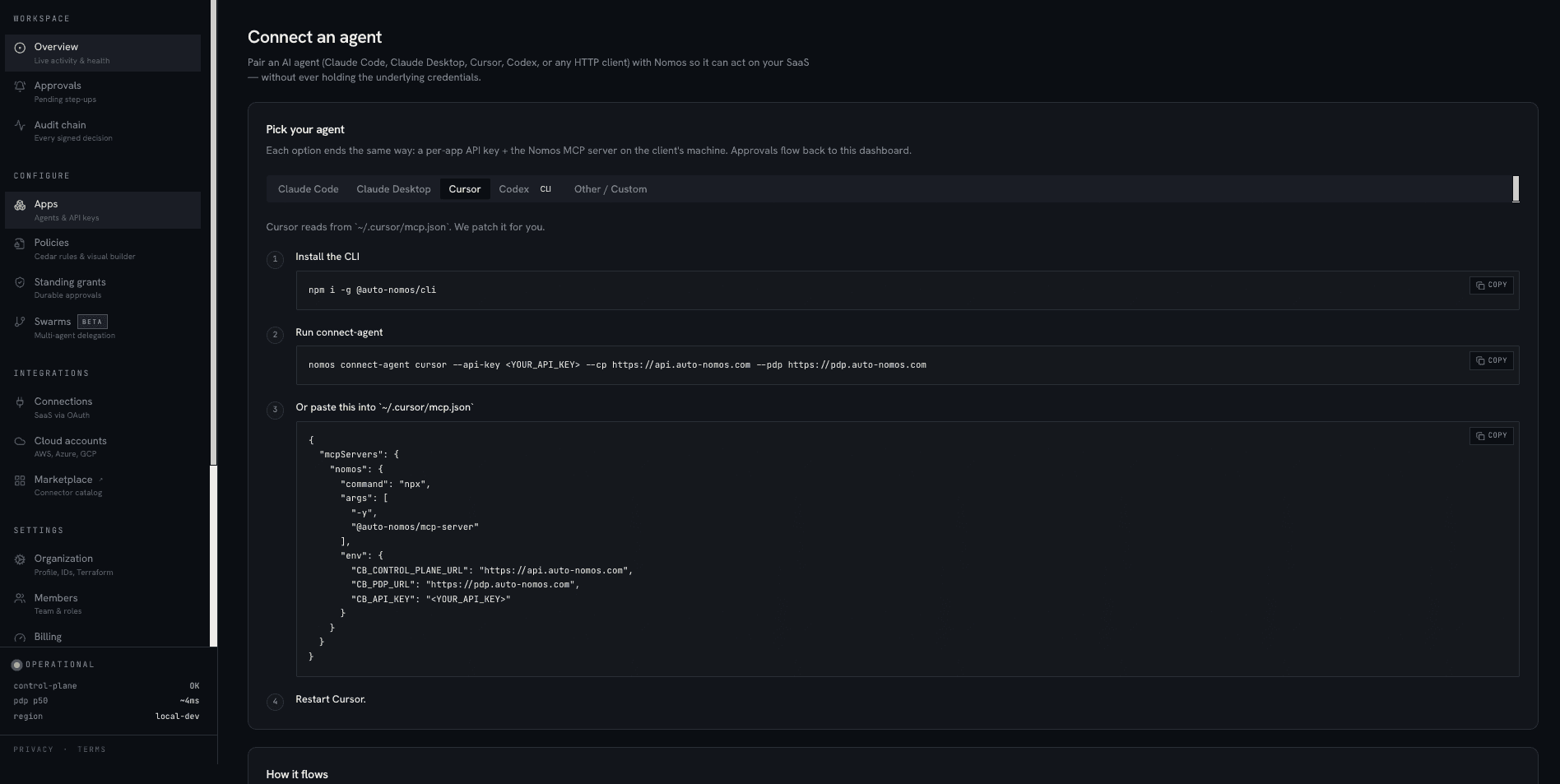
The dashboard's Connect an agent page (/app/connect)
has a Cursor tab: install the CLI and run the connect command, or paste the prepared
block into ~/.cursor/mcp.json, then restart Cursor — API key and URLs pre-filled.
Before you start
- Cursor 0.42+ (older versions: MCP picker lives under Settings → Beta Features).
- A Nomos App with an API key (Get started → Register your first App).
- At least one Connection (e.g. GitHub).
Step-by-step
- 1Open Cursor's MCP settings
Cursor → Settings → MCP → Add new server.

Cursor MCP picker. 'Add new server' is the entry point. - 2Pick command-based config
Cursor calls
npxwith the MCP server package. Use this exact block:jsonc { "name": "Nomos", "command": "npx", "args": ["-y", "@auto-nomos/mcp-server@latest"], "env": { "NOMOS_CONTROL_URL": "https://control.auto-nomos.com", "NOMOS_API_KEY": "nk_live_…", "NOMOS_PDP_URL": "https://pdp.auto-nomos.com" } }Replace the API key with the one you copied from the App detail page.

Cursor expects command + env. Pin a specific version (e.g. @0.0.20) for stable deployments. - 3Restart Cursor + verify tools
Cursor reloads MCP servers on launch. Quit and re-open. The Tools picker (next to the chat input) now shows tools like
github_issue_list,github_pr_create,slack_message_post— one per connected provider, one per allowed command.
One tool per allowed command. Disabled tools are policy-gated. - 4Ask Cursor to do something
In the chat: "List the open issues on acme/app." Cursor sees the
github_issue_listtool, the MCP server asks Nomos for a UCAN, the PDP allows it, GitHub responds, Cursor reads the list.
Tool call + response inline in the chat. The OAuth token never enters Cursor's process.
Verify it worked
- Cursor's tool picker shows tools prefixed with the connected providers
(
github_*,slack_*, etc.). - Asking a question that requires a tool call results in a real upstream response.
- The Nomos audit page (
/app/audit) shows one row per tool call, attributed to your App's DID.
When something asks for approval
The MCP server runs inside Cursor's process — but the approval lives on your phone (or browser). If a tool call hits a step-up gate, the MCP server:
- Returns a deny + push notification.
- You tap the notification, sign with your passkey.
- The MCP server retries the same call with the cosigner UCAN.
Cursor sees a brief pause, then the tool returns the result. You don't need to do anything in Cursor.
Step-up gate examples
By default, the github:read-only template never triggers step-up. Templates like
github:safe-default, github:exec, ssh:exec-step-up, and
filesystem:delete-step-up do — Cursor will pause for ~3 seconds while the
push lands and you approve.
Locking down a Cursor laptop
Each laptop should have its own API key with the narrow member role.
# in Cursor's env (Settings → MCP → edit server → env)
NOMOS_API_KEY="nk_live_for_my_laptop_only"
When the laptop is decommissioned, revoke that one key from the App detail page — existing UCANs continue to work until expiry, but no new ones can be minted.
Common failures
Cursor's tool picker is empty after restart+
MCP server didn't start. Open Cursor → Output → MCP, look for the Nomos process. Most common cause: wrong NOMOS_CONTROL_URL (missing https://, trailing slash) or wrong API key. Fix env and restart.Every tool call returns 'unauthorized'+
API key was revoked or belongs to a different org. Re-issue from the App detail page and update Cursor's MCP env.Tool calls show but always deny+
No policy attached, or the policy doesn't permit the command. Open the audit row — the `reason` field tells you which. Attach `github:read-only` or `github:safe-default` to the App as a sanity check.