Wire raw MCP
Generic MCP host walkthrough. Use this if your agent host isn't Cursor, Claude, or Codex.
Any MCP-speaking agent host can use Nomos. The @auto-nomos/mcp-server package runs as
a standalone subprocess; your host's job is to spawn it with the right env vars and
read the tools it advertises.
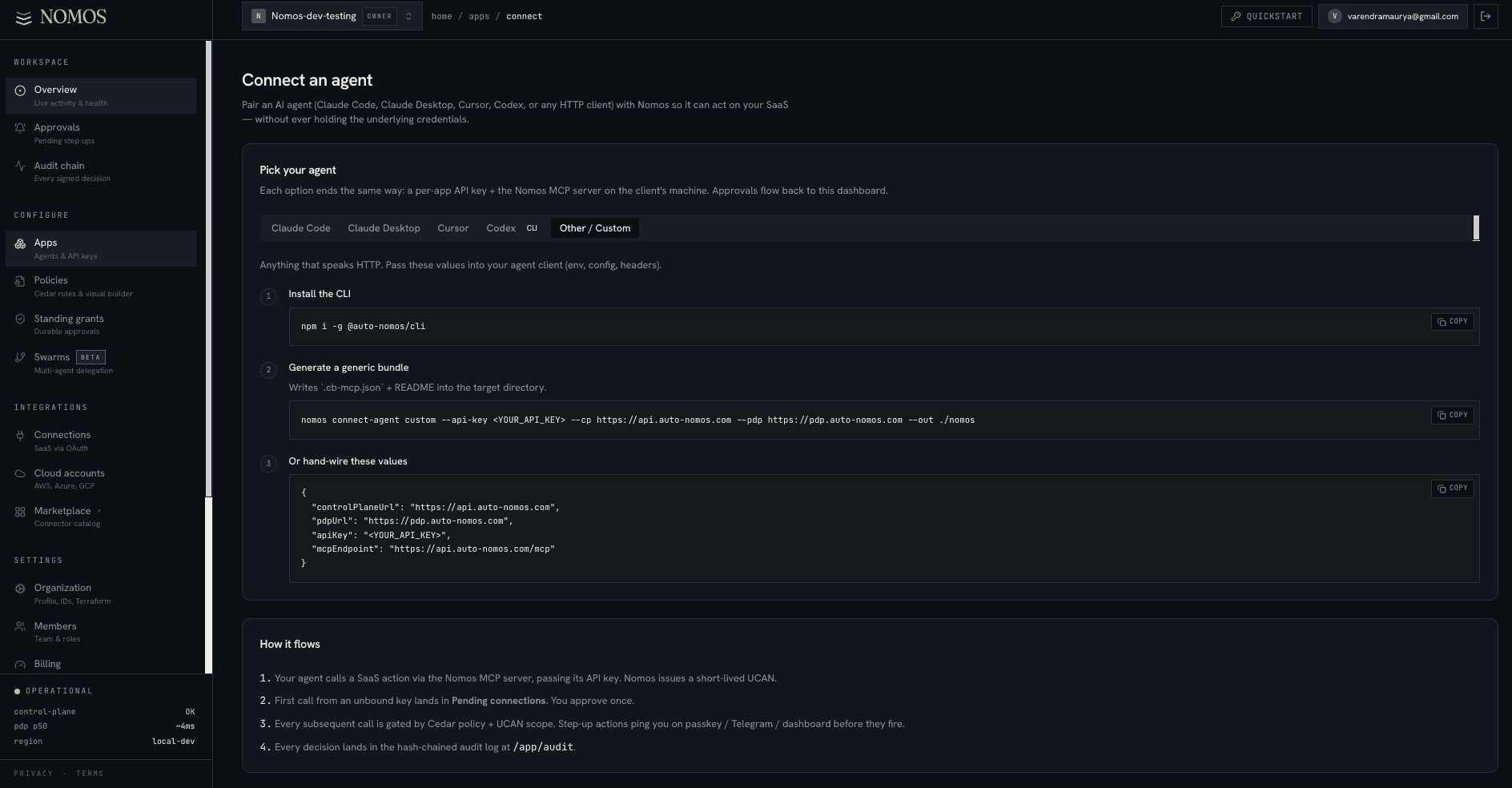
The dashboard's Connect an agent page (/app/connect)
has an Other / Custom tab for exactly this case: install the CLI and generate a
generic bundle, or just copy the three env values (NOMOS_CONTROL_URL,
NOMOS_API_KEY, NOMOS_PDP_URL) and hand-wire them into whatever host you run.
The contract
The MCP server:
- stdin / stdout transport by default (most hosts).
- HTTP with
--transport http --port 7878if your host needs out-of-process. - Speaks MCP 2024-11 spec, all
tools/*methods.
Spawn it
NOMOS_CONTROL_URL=https://control.auto-nomos.com \
NOMOS_API_KEY=nk_live_… \
NOMOS_PDP_URL=https://pdp.auto-nomos.com \
npx -y @auto-nomos/mcp-server@latest
Or pinned for prod:
npx -y @auto-nomos/[email protected]
What it advertises
On tools/list, the server returns one tool per allowed (provider, command) pair.
Examples:
github_issue_list—GET /github/issue/listgithub_pr_create—POST /github/pr/createslack_message_post—POST /slack/message/postfilesystem_file_read— file ops (gated by path-prefix UCAN constraint)ssh_exec— remote shell (always step-up by default)
Each tool's inputSchema is a JSON Schema generated from the YAML adapter for that
command.
What happens on a tool call
- Host invokes
tools/callwithname="github_issue_list"and validated args. - MCP server asks the Nomos control plane for a UCAN scoped to
/github/issue/liston the args' resource. - PDP runs your policy:
- Allow → MCP server makes the PDP call, returns the response.
- Step-up → MCP server returns a structured
requires_approvalerror; host displays "waiting for approval"; user signs with passkey; MCP server retries with cosigner UCAN. - Deny → MCP server returns an MCP
errorwithreasonpopulated.
HTTP transport
If your host prefers HTTP over stdio:
npx -y @auto-nomos/mcp-server@latest --transport http --port 7878
Then point your host at http://localhost:7878/sse (Server-Sent Events). The same
env vars + same tool advertisement.
When to use HTTP
Out-of-process orchestrators, container-isolated agent hosts, multi-tenant editors. In single-process desktop agents (Cursor, Claude, Codex), stdio is faster and simpler.
Probe the server manually
# In one terminal:
NOMOS_API_KEY=nk_live_… npx -y @auto-nomos/mcp-server@latest --transport http --port 7878

# In another:
curl http://localhost:7878/health    # → {"ok":true}
For full MCP probing, use the mcp-inspector package — it shows every tool, every
schema, every advertised capability.
npx -y @modelcontextprotocol/inspector \
  npx -y @auto-nomos/mcp-server@latest
Common failures
tools/list returns empty+
MCP server spawned but control-plane returned 0 commands. Usually means: no App matches the API key, no policy attached, or no Connection on the org. Check /app/audit for the authorize attempts.tool call hangs forever on step-up+
Host doesn't handle `requires_approval` errors. Either upgrade the host's MCP client lib, or set NOMOS_APPROVAL_MODE=fail_fast in env to deny immediately instead of waiting.Errors mention 'apiCall schema_missing'+
Adapter version mismatch. Upgrade @auto-nomos/mcp-server to ≥ 0.0.18; older versions silently allowed commands the YAML adapter didn't define. Newer versions fail-closed.