Step-up approvals
When a policy denies, a human signs. Passkey-gated. Five seconds from push to retry.
Step-up is the bridge between "policy denied this" and "the agent gets through anyway, because a human just confirmed it's fine." The whole loop is five steps and under five seconds in the common case.
The five steps
- 1Cedar returns step-up
Your policy includes
when { context.cosigner == true }on a sensitive action. The agent's call lacks cosigner — Cedar denies withrequires_step_up. - 2Nomos opens an approval envelope
The control plane writes a row to
approval_envelopeswith a 60-second TTL. Push notifications fan out (web push, Knock email, Telegram, your custom webhook). - 3You tap, your browser signs
Notification deep-links to
/approve/<envelopeId>. The page shows the agent, the action, the resource, the purpose, and a risk badge. You hit Allow once (or Deny once). The browser asks for your passkey assertion (Touch ID / Face ID / hardware key); sign. First time on this device there's no passkey yet — hit Register passkey to enroll, then the same tap signs. - 4Nomos mints a cosigner UCAN
The control plane verifies the passkey assertion, mints a cosigner UCAN bound to the envelope, hands it back to the agent's MCP server / SDK.
- 5Agent retries with cosigner attached
Same intent + cosigner UCAN. Cedar's
when { context.cosigner == true }now matches. PDP allows. Upstream call runs.
TTLs
- Approval envelope — 60s default; configurable per template up to 5 minutes.
- Cosigner UCAN — 5 minutes from mint.
- After cosigner expiry, the same retry would re-trigger step-up.
Two ways policies can require step-up
Inline when { !context.cosigner }
forbid ( principal, action == Action::"/github/repo/put_file", resource )
  when { !context.cosigner };
This is the explicit way: the rule is in your Cedar. The default templates use this for destructive actions.
Implicit step-up from a template tag
Templates marked risk: step_up in their YAML get a fallback step-up gate
automatically — even if your Cedar doesn't mention cosigner. Lets the platform raise
the floor for newly-discovered risky actions without forcing a policy rewrite.
What the operator sees
The dashboard's Approvals queue tabs across Pending / Awaiting / Approved / Denied / Expired, with an all-agents filter. Each row carries the agent, command, resource, state, scope, who resolved it, when it was decided, and when it was requested. View opens the detail screen.

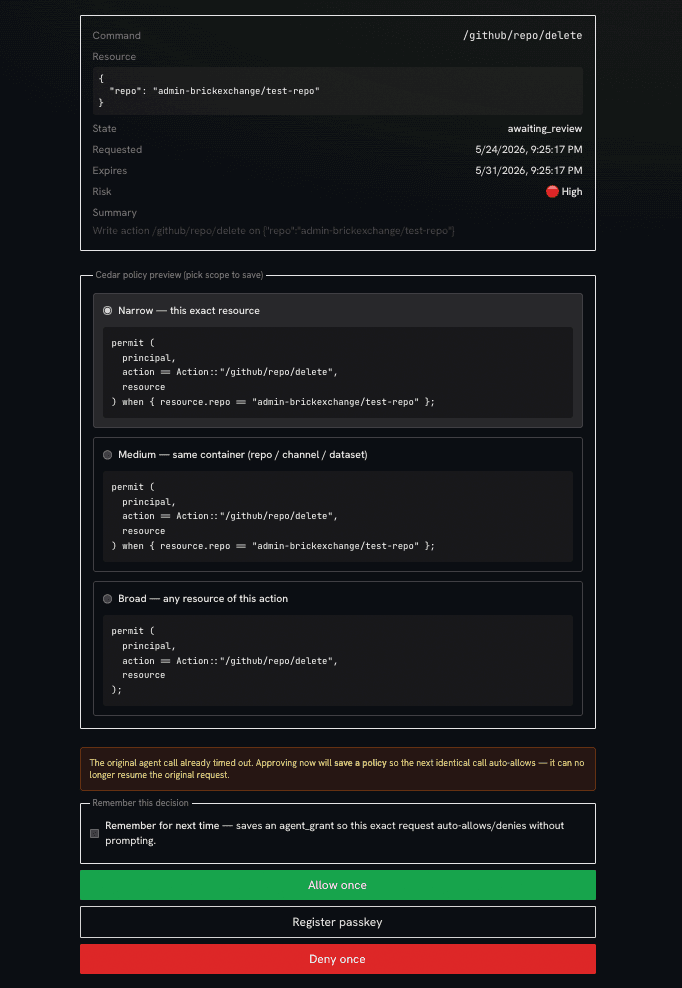
The approval detail screen
View on a row opens the decision page. The header restates the Command,
Resource, State (awaiting_review), Requested / Expires timestamps,
a Risk badge, and a one-line Summary of what the agent wants to do.
Below that is a Cedar policy preview — the rule that gets saved if you choose to remember the decision. Pick how wide to make it:
- Narrow — this exact resource.
permitgated to the one repo / channel / object in the request. - Medium — same container. The whole repo / channel / dataset, not just the one object.
- Broad — any resource of this action.
permiton the action with no resource condition.
Each option renders the exact permit block it would write, so there's no drift
between what you click and what's stored.
Two checkboxes decide persistence:
- Remember for next time — saves an agent_grant so the next identical request auto-allows (or auto-denies) without prompting. This is the same machinery as a standing grant, created straight from the approval screen at the scope you picked above.
- Leave it unchecked and the decision is one-shot — the next request prompts again.
The actions are Allow once (green), Register passkey (when no passkey is enrolled yet), and Deny once (red).
The original request may have already timed out.
Envelopes expire in 60s. If the agent gave up before you got here, approving no longer resumes that call — but with Remember for next time on, it saves the policy so the agent's next identical request sails through.
What the auditor sees
Every step-up writes three audit rows:
- The initial
denywithreason: requires_step_up. - The cosigner UCAN mint event with the passkey credential id.
- The retry that succeeded, linked to the cosigner UCAN cid.
/app/audit?filter=decision:step_up filters to just these chains.
Passkey assertion never leaves the browser.
The cryptographic assertion is computed on your device. Nomos's server verifies the assertion against the registered public key. There's no shared secret.